Trigger Alerts
Grillo Cloud can email your team when a trigger reaches an alert level. The level is measured as horizontal peak ground acceleration (PGA), in mg.
The alert level is separate from the trigger threshold. The threshold decides when a sensor records; the alert level decides which of those recordings are worth an email. For example, a sensor with a 5 mg threshold and a 50 mg alert level records every disturbance above 5 mg, and emails you only when shaking reaches 50 mg.
Turn on alerts
Everyone in a Structural project can see the alert level and recipients in Settings → Recording & triggers, under Trigger emails. Owners and admins change them on the previous dashboard's Project Settings page:
- Go to cloud.grillo.io/organization.
- Under Trigger alerts, enter an Alert level (mg) between 1 and 2000 mg. 1000 mg is 1 g.
- Under Recipients, add up to 25 email addresses. Recipients do not need a Grillo Cloud account. If you add none, alerts go to the project's owners and admins.
- Select Save.
- Select Send test email to send a sample alert to yourself.
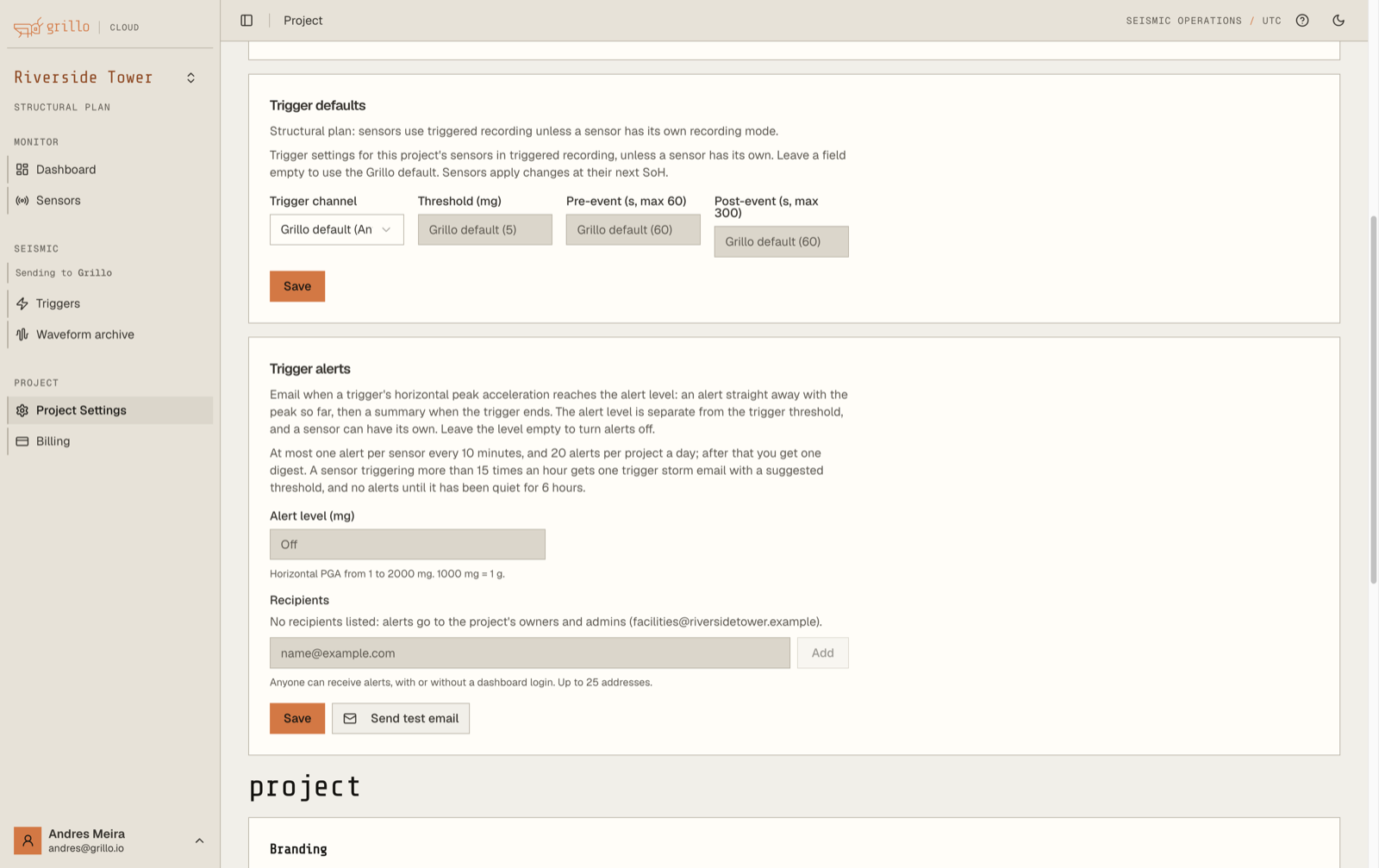
To turn alerts off, clear the alert level and save. The setting then shows Off.
A different level for one sensor
A sensor in a busy location may need a higher level than the rest of the project. Contact Grillo Support with the Device ID and the level you want.
What you receive
Each recipient gets their own email.
- Alert. Sent as soon as the trigger's horizontal PGA reaches the alert level, normally within seconds of the data reaching Grillo. It gives the peak so far.
- Summary. Sent when the trigger ends, with its final values.
Both emails give the project, the sensor's station code and location name, the alert level that was crossed, the horizontal PGA in mg and %g, the PGA on each axis, the vertical PGV, the dominant frequency, the peak time in UTC, and the duration, with a link to the trigger in Grillo Cloud.
Limits
To keep a busy sensor from filling your inbox:
- Per sensor: at most one alert every 10 minutes. Triggers that cross the level in that time are counted in the next summary.
- Per project: at most 20 alerts a day. After that, recipients get one digest listing each sensor's triggers and largest PGA.
- Trigger storm: a sensor that triggers more than 15 times in an hour gets one trigger storm email, with a suggested threshold. It sends no more alerts until it has been quiet for 6 hours.
The suggested threshold is twice the typical horizontal PGA of that hour's triggers. If you accept it, ask Grillo Support to raise the sensor's threshold.
On the trigger page
Each trigger's details show Email alert:
| Status | Meaning |
|---|---|
| Sent time to n recipients | The alert went out |
| Not sent: this sensor had an alert in the previous 10 minutes | The per-sensor limit applied |
| Not sent: this sensor is triggering too often (trigger storm) | The sensor is in a trigger storm |
| Not sent: the project reached its daily alert limit | The project had 20 alerts today |
| No summary: trigger storm or No summary: daily alert limit reached | The summary was held back for the same reasons |
A trigger that never reached the alert level shows no alert.
If an alert did not arrive
- Check the trigger's Email alert status.
- Confirm the trigger's horizontal PGA reached the alert level, using the sensor's own level if it has one.
- Check spam or junk folders, and ask your email administrator whether mail from Grillo is being blocked.
- Use Send test email to confirm delivery to your address.
:::note Trigger alerts and the Alerts page Trigger alerts are emails about shaking at your sensors. The Alerts page in the menu bar is for earthquake early-warning alerts sent to phones, and does not list trigger emails. :::
:::warning Not a safety system Trigger alerts are sent over email and can be delayed by mobile networks and email providers. Do not rely on them alone for life-safety decisions. :::