Recording Mode and Thresholds
:::note Handled by Grillo Support for now The new Grillo Cloud dashboard does not yet have a way to change a sensor's recording mode or threshold. Until it does, contact Grillo Support with the Device ID and the settings you want, and Grillo will make the change for you. The steps below describe the previous dashboard. :::
A sensor records in one of two modes:
| Mode | What the sensor uploads |
|---|---|
| Continuous | Everything it measures, all the time |
| Triggered | Nothing until shaking crosses its threshold. Then it uploads from up to 60 seconds before the crossing until the shaking stops, and Grillo Cloud records it as a trigger |
In both modes the sensor sends its health reports every minute or less, so it shows as online either way.
By default the project's plan decides the mode: sensors on the Structural plan record triggered, and sensors on every other plan record continuous. Owners and admins can give a sensor its own mode.
See a sensor's mode and threshold
Open Sensors and select a triggered sensor. Its details show a summary such as Triggered · 5 mg threshold · 12 triggers since boot · last trigger 2 hours ago, and the Trigger threshold, marked project default or set for this sensor. The trigger count starts again from zero when the sensor restarts.
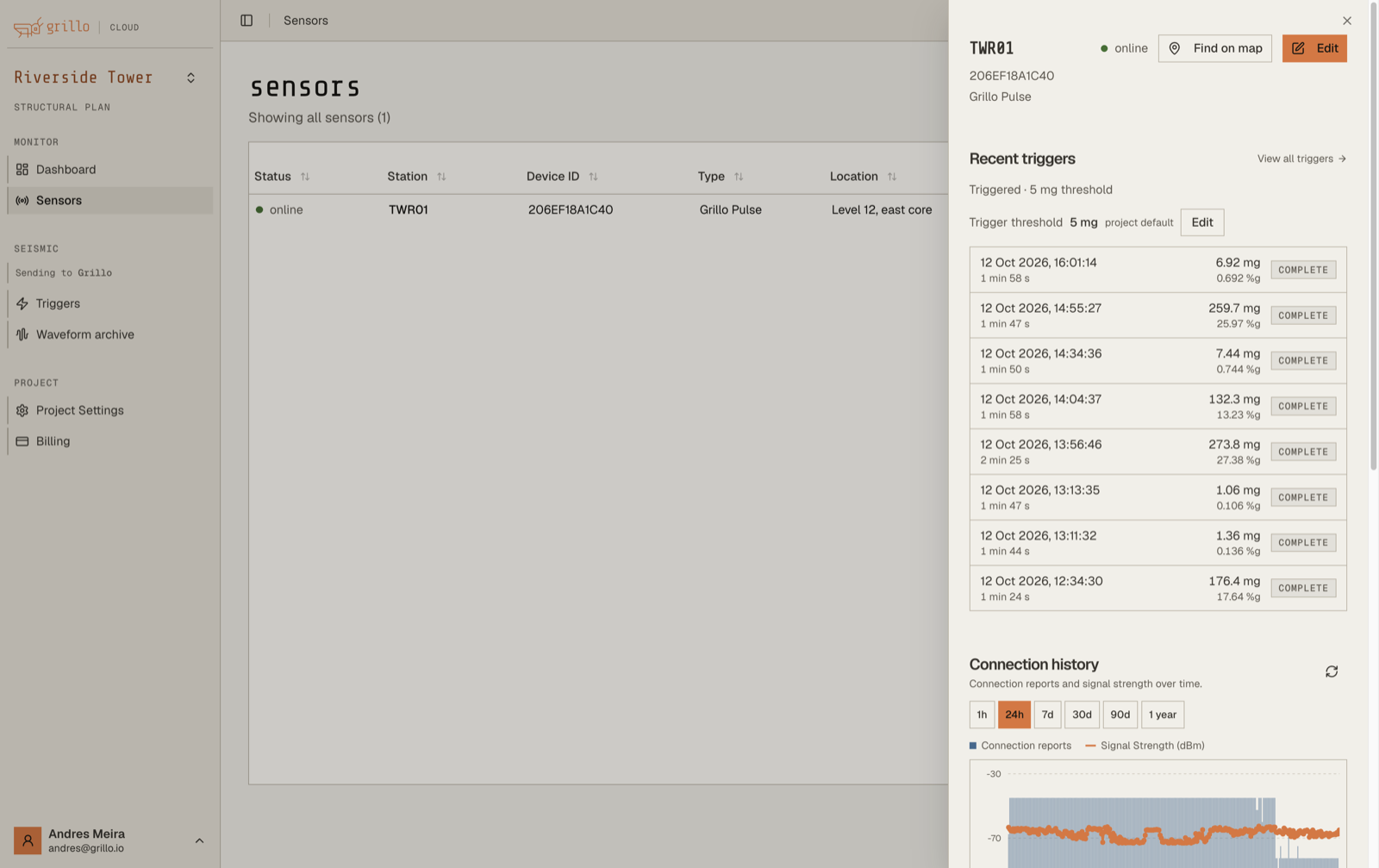
Below it, Recent triggers lists the sensor's latest triggers.
Change a sensor's threshold
Owners and admins can change the threshold from the sensor's details:
- Next to Trigger threshold, select Edit.
- Enter a threshold between 1 and 2000 mg, in steps of 0.5 mg.
- Select Save.
To go back to the project's threshold, select Edit, then Use project default.
The sensor applies the change at its next check-in, usually within a minute. Until then its details show Pending — device has not applied this yet.
Change a sensor's recording mode
Owners and admins can set a sensor's mode and all of its trigger settings:
- Open the sensor's details and select Edit.
- Under Recording mode, choose:
- Follow project plan, to use the plan's mode. The option shows the mode the plan currently uses.
- Continuous
- Triggered
- For a triggered sensor, leave Use project trigger defaults on, or turn it off to give the sensor its own settings.
- Select Update Device.
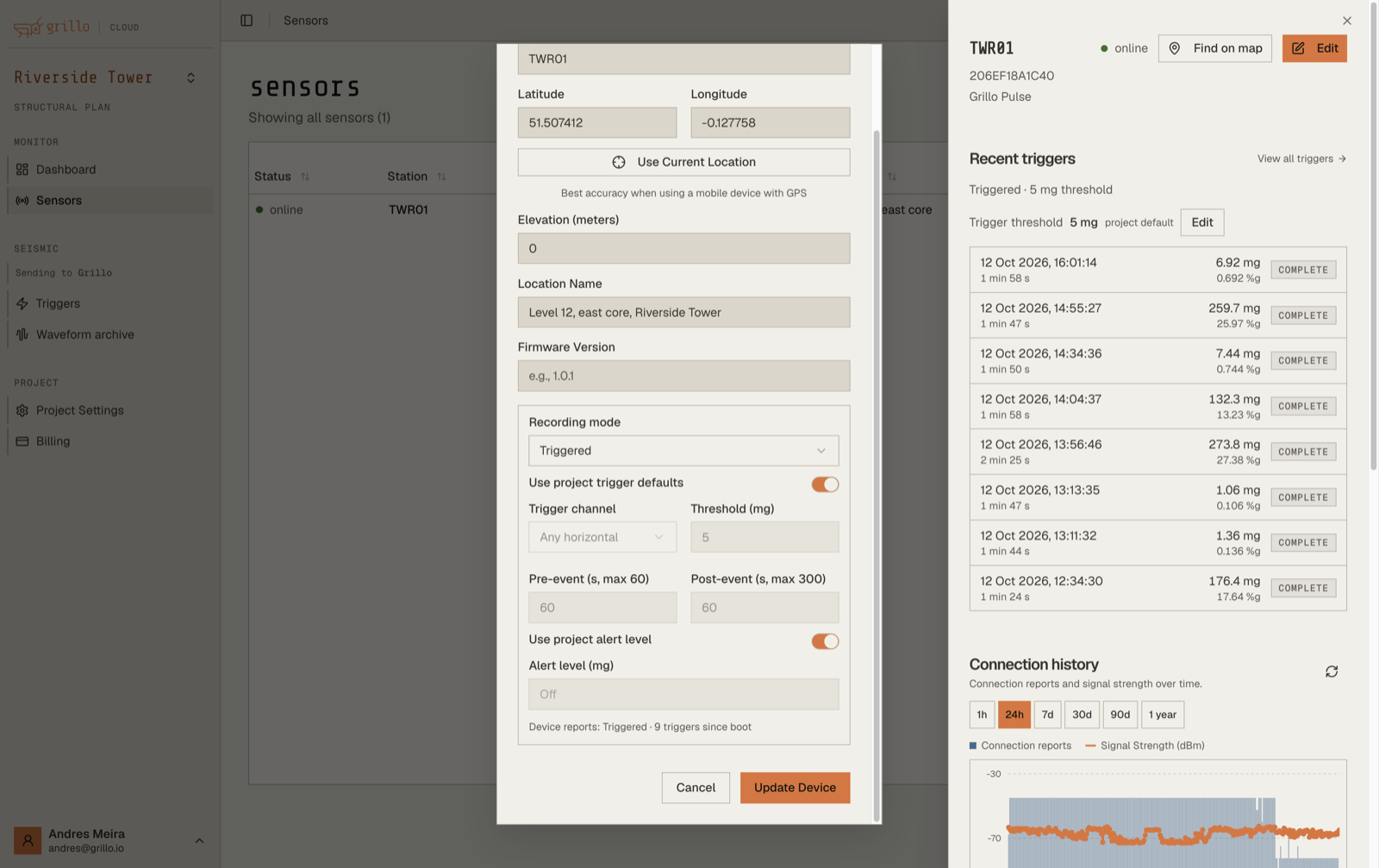
Below the settings, the dialog shows what the sensor last reported: its mode, the number of triggers since it started, and whether it is recording an event now.
Trigger settings
| Setting | Range | Grillo default |
|---|---|---|
| Trigger channel | Any horizontal, HNE (east), HNN (north), or HNZ (vertical) | Any horizontal |
| Threshold (mg) | 1 to 2000 mg | 5 mg |
| Pre-event (s, max 60) | Seconds kept from before the threshold was crossed, 0 to 60 | 60 s |
| Post-event (s, max 300) | Seconds the sensor keeps recording after the shaking last crossed the threshold, 0 to 300 | 60 s |
| Alert level (mg) | The level for trigger alerts. Leave Use project alert level on to use the project's | The project's level |
Any horizontal triggers when either horizontal axis crosses the threshold. A vertical-only knock may not trigger it.
Set the project's trigger defaults
On Structural projects, everyone can see the defaults in Settings → Recording & triggers. Owners and admins can change them on the previous dashboard's Project Settings page:
- Go to cloud.grillo.io/organization.
- Under Trigger defaults, set the trigger channel, threshold, pre-event, and post-event times. Leave a field empty to use the Grillo default.
- Select Save.
Sensors that use the project trigger defaults apply the change at their next check-in. Sensors with their own settings keep them.
Choose a threshold
The right threshold is above the normal vibration at the sensor's location and below the shaking you want to record.
- Start with the default of 5 mg.
- If a sensor records triggers all day from machinery, lifts, or traffic, raise its threshold. Look at the Horizontal PGA of those triggers on the Triggers page and set the threshold above them.
- If it records nothing during events you can feel, lower it.
A sensor that triggers more than 15 times in an hour is in a trigger storm. Grillo emails the alert recipients once, with a suggested threshold. See Trigger Alerts.
Which sensors support triggered recording
Triggered recording needs current Grillo Pulse firmware. If a sensor's firmware cannot record triggered, its details show Not reported by this firmware. Update its firmware, or contact Grillo Support.
Settings are saved on the sensor, so it keeps recording the same way after a restart.