Grillo Cloud for Slide
The Slide dashboard at slide.grillo.io shows the readings from your Grillo Slide kits: how far each rover has moved, and the health of every device.
It is separate from cloud.grillo.io, which is for Grillo Pulse and Grillo One.
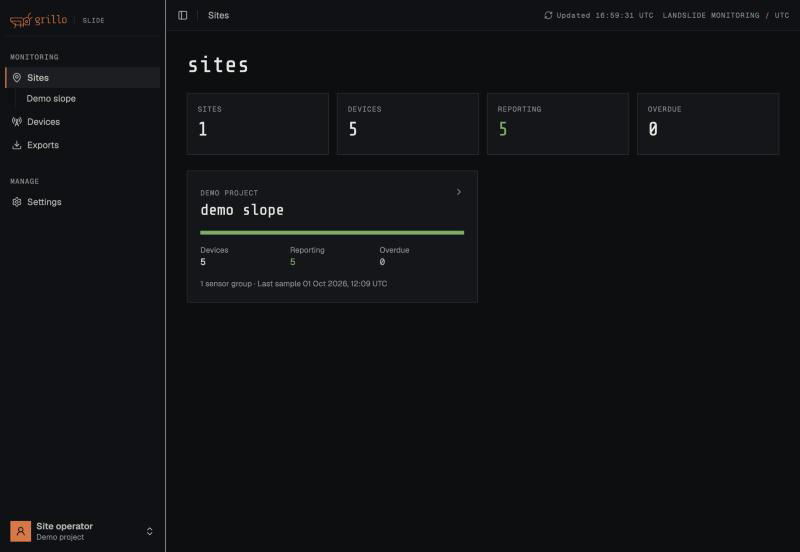
Screenshots in this section use demo data.
Sign in
Grillo creates your account and sends you the sign-in details. There is no self sign-up.
- Open slide.grillo.io.
- Enter your email address and password.
You can also select Send sign-in link instead to receive a one-time link by email. To set a new password, use the reset option on the sign-in page and follow the emailed link.
The same account signs you in to the Grillo Field app, which is on Android now with the iPhone version coming soon.
How your devices are organized
Project
└── Site
    └── Sensor group
        ├── Base
        └── Rovers
- A project is your organization's account. You only see your own projects.
- A site is one location you monitor.
- A sensor group is one base and its rovers.
Navigation
| Page | Use it to |
|---|---|
| Sites | See all your sites, with counts of devices reporting and overdue. Open a site to see its devices. If your account can create sites, Add site creates a new site with one sensor group, ready for devices set up in Grillo Field. |
| Devices | Search every device across your sites by name, printed ID, or site, in a Table or on a Map. |
| Exports | Download movement, battery, and location data. |
| Settings | Open your account and API tokens. |
What your account can do
Grillo sets what each account can do. Depending on yours, some of these may be missing:
| Action | Needs permission to |
|---|---|
| Rename sites and sensor groups, add a site | Manage sites |
| Reset a movement baseline | Manage baselines |
| Export readings | Export data |
| Request and download raw GNSS files, download original measurement files | Export technical data |
| Create API tokens | Manage API tokens |
| Set up and claim devices in Grillo Field | Set up devices |
If a button you expect is missing, or a page says you don't have permission, ask Grillo Support to change your account.
Guides
- Sites and Devices — read movement and device health
- Export Data — download readings and raw GNSS files
- Firmware and API Access
- Landslide Monitoring with GNSS — how to read the movement results
Not available yet
- Automated landslide alerts
- Inviting other users from the dashboard. Ask Grillo Support to add a colleague.
- Moving a sensor group between sites