Export Slide Data
You can download your readings as files, and request raw GNSS observations for your own processing.
Export readings
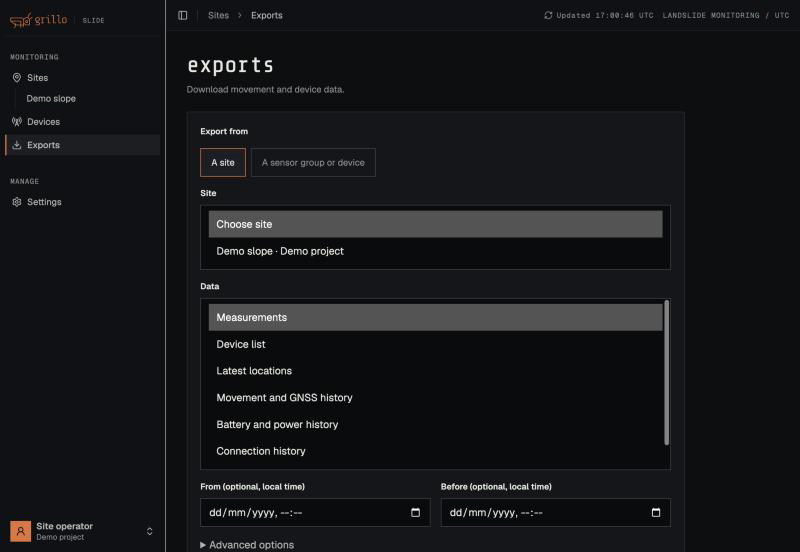
-
Open Exports, or select Export data on a site page.
-
Under Export from, choose A sensor group or device, A site, or Export a whole project instead. For a sensor group, export all its devices or pick one.
-
Choose what to export:
Dataset Contents Formats Measurements Movement east, north and up in mm, fix quality, baseline, battery CSV, JSON Movement and GNSS history Movement plus satellites and correction details CSV, JSON Battery and power history Resting and loaded battery voltage, power mode CSV, JSON Connection history Mesh and mobile signal, missed cycles CSV, JSON Device list Device IDs, names, and roles CSV, JSON Latest locations Each device's latest position GeoJSON, JSON Calculated outlooks Outlooks Grillo calculates from the readings, such as battery and next report CSV, JSON -
Optionally set From and Before to limit the period. Times are in your local time.
-
Select Estimate and request export. The page shows the estimated rows and size.
-
When the export is ready, select Download data.
Each export comes with a manifest that records what was included and a SHA-256 of the content.
Under Advanced options you can choose exactly which columns to include. Reset to default fields restores the standard set. The API / field dictionary link describes every column.
If the page says your account does not have permission to export, ask Grillo to enable it.
Original measurement files
Each reading on the dashboard comes from a report the base uploaded. To download that report exactly as received, open a device's readings, select Open immutable source batch, then Download data. The file is CBOR or JSON. Copy API request gives you the same request for your own tools. This needs permission to export technical data.
Raw GNSS observations
For independent processing, the devices can record raw GNSS observations and upload them as RTCM3 files.
Request raw observations
- Open the site and choose the sensor group.
- Expand Raw observations on the site page.
- Tick the devices to record from. Include the base and at least one rover if you plan to post-process a baseline.
- Choose how long the request stays active: 1, 2, 6, or 24 hours.
- Confirm the request.
The base picks the request up at its next upload and the rovers at the cycle after, so files start arriving within two cycles. With a 6-hour cycle, choose a duration long enough to cover the cycles you want.
Each device records one file per cycle, up to about 2 minutes long. Recording raw data never replaces the normal reading for that cycle.
To stop early, select Cancel request.
Download the files
Open a device's details and select the Raw files tab, then Download RTCM3.
Post-process the files
The files contain RTCM3 MSM observations and no ephemeris. To process a base and rover pair you also need a broadcast ephemeris file for that day, for example the daily file from the IGS.
With RTKLIB:
- Convert each
.rtcm3file to RINEX observations withconvbin. - Run
rnx2rtkpin static mode with the rover file, the base file, and the broadcast ephemeris. - Set the base position from the 1005 message in the base file.
Use files from the same cycle for the base and the rover.