Sites and Devices
Open a site
Select Sites, then Open site. The site page shows:
- Counts of devices that are Reporting, Overdue, or have No report
- The devices in a List or on a Map
- A Sensor group selector, if the site has more than one group
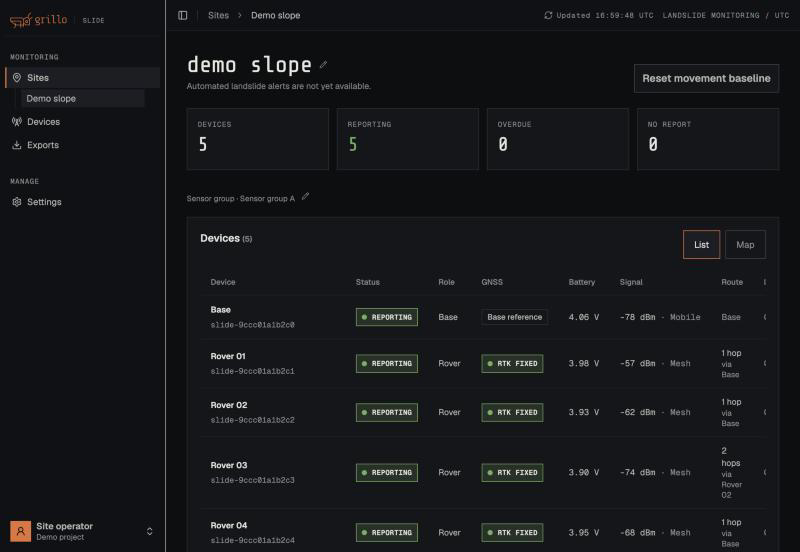
Use the rename control next to the site name or the sensor group name to change it.
Device status
| Status | Meaning |
|---|---|
| Reporting | The device reported in the latest cycle and its next report is not yet due |
| Alive · no fix | A rover reached the base but did not get a precise position fix this cycle |
| Missing | The base did not hear from this rover. The status shows how many cycles it has missed. |
| Overdue | No report has arrived since the device's next report was due |
| No report yet | The device is registered but has never delivered a report |
Slide reports every 6 hours, so a device that looks quiet may simply be asleep until the next cycle. Check the Last sample time before you act. One or two missed cycles deserve a look; three or more usually mean a fault.
Device details
Select a device to open its details. The tabs are Health, Movement, Battery, Connection, Firmware, and Raw files.
Health
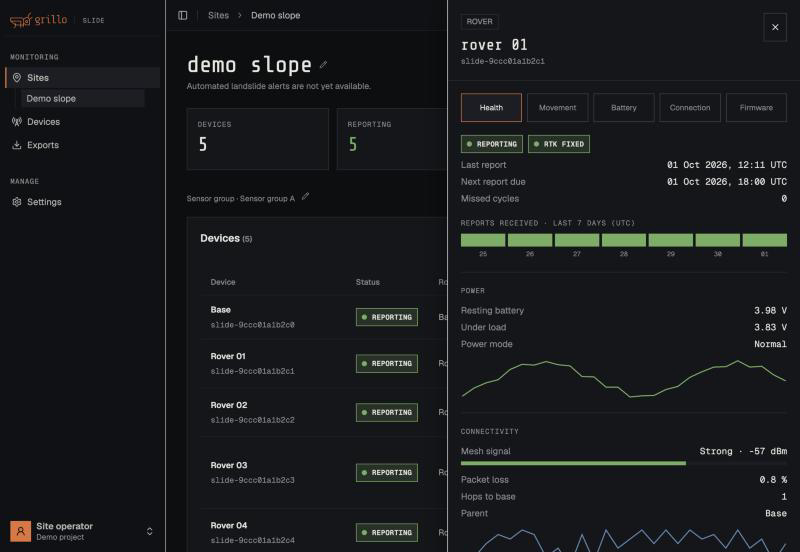
| Section | Values |
|---|---|
| Connectivity | Last heard, next report due, missed cycles, reports received, packet loss. For rovers: the device they relay through (Parent) and Hops to base. |
| Positioning | GNSS fix, satellites used, horizontal accuracy, and correction age |
| Power | Resting battery voltage, voltage under load, and power mode |
| Firmware | Running version |
Battery voltages are marked Uncalibrated until a device has been battery-calibrated. Treat them as approximate.
Movement
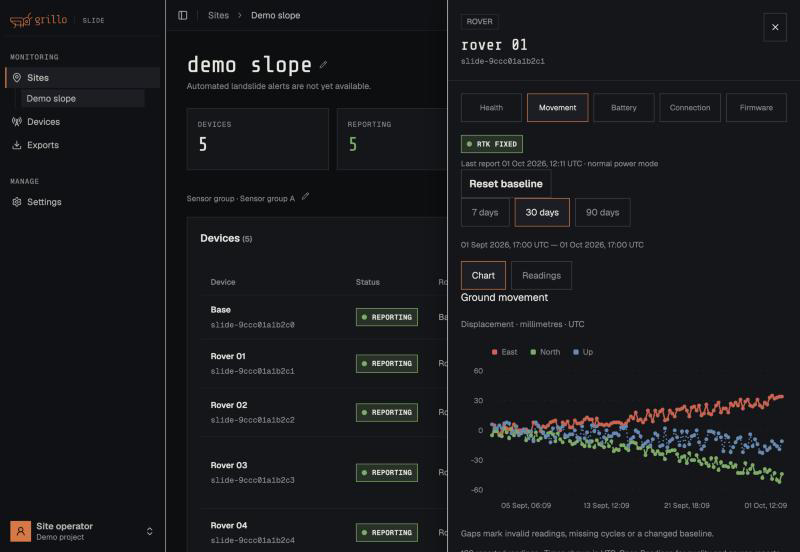
The Ground movement chart shows a rover's position relative to its baseline, in millimetres, as three lines: East, North, and Up. Choose 7, 30, or 90 days.
- Movement is the rover's position minus the base's position, measured in the same cycle.
- The baseline is the rover's first valid reading. Everything after is measured against it.
- Only readings with a precise fix (RTK Fixed) are plotted. Gaps mark missed cycles, readings without a fix, or a baseline change.
- Single readings scatter by up to about 2 cm. Judge movement from the trend over several days, not from one point. See Landslide Monitoring with GNSS for how to read the results.
Switch from Chart to Readings to see each reading with its fix quality and timestamps.
Battery and Connection
Battery charts the battery voltage, resting and under load. Connection charts signal strength: rovers report their mesh radio signal, and the base reports its mobile signal.
Reset the movement baseline
Reset the baseline when a device has been deliberately moved or remounted, so the move is not counted as ground movement.
- For one rover: open its details, go to the Movement tab, and select Reset baseline.
- For every rover in a sensor group: select Reset movement baseline on the site page.
The rover's next valid reading becomes the new zero. Earlier movement is no longer measured against the old baseline, so note the values before you reset.
Reset the whole sensor group after moving the base or its antenna. Moving the base shifts every rover's movement by the same amount. If the base is now in a new place, first survey it again with its RESET button, then reset the baseline.
Devices awaiting setup
A device listed as Awaiting setup has been linked to your account but has not finished setup in the Grillo Field app. It does not report until setup is complete. Kits are normally set up by Grillo before shipping, so contact Grillo Support if a device stays in this state.